Email on your company domain, without losing your old messages.
Authorised Zoho partner since December 2024 · Partner ID PE7546355
Zoho Mail gives your whole team addresses like name@yourcompany.md, with a shared calendar and contacts. Zoho Workplace adds chat, video calls, shared files and editors that work with Word and Excel. We set up the domain and DNS, then move your messages across from Gmail, Microsoft 365 or your old server.
Zoho Mail Lite: 29 MDL / user / month, 350 MDL billed annually
on monthly billing: 33 MDL / user / month
Who Zoho Mail is for
It suits you if:
- Your team emails customers from personal Gmail addresses.
- You want the address, and all its correspondence, to stay with the company when someone leaves.
- You have an old mail server that nobody looks after any more.
- You pay for Google Workspace or Microsoft 365 and only use the email.
It doesn't suit you if:
- Your company works in Word, Excel and Teams every day and is attached to Microsoft 365. Stay with it; Zoho Mail won't add anything.
- You need a single contact address that reaches a phone. A forward set up with your domain registrar will do.
What your team gets in Zoho Workplace
Zoho Mail Lite is email only, with calendar and contacts. Zoho Workplace adds the rest of the team tools, on the same account.
An inbox on your company domain, with filters, calendar, tasks and notes alongside. Shared addresses (sales@, accounts@) that several people can see.

Calendar
Shared team calendars, rooms and appointments, linked to the inbox.
WorkDrive
Company files by team, with shared folders, access rights and version history.

Writer
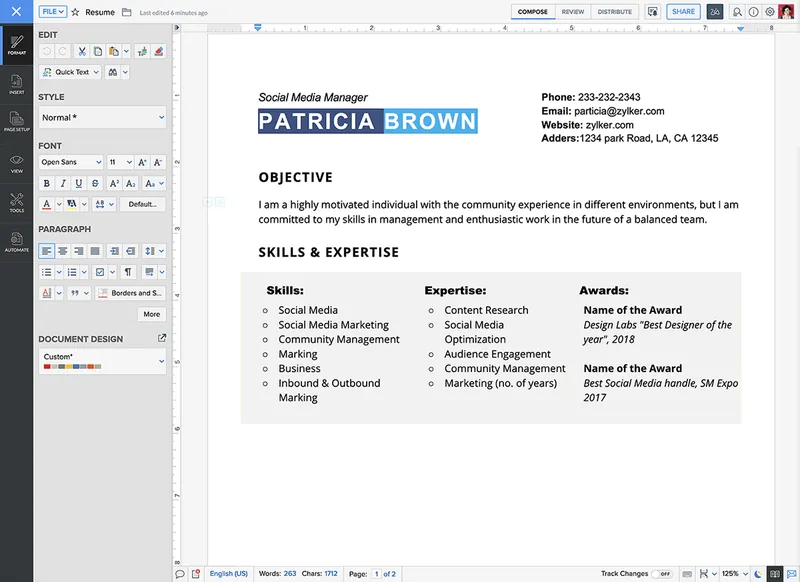
Documents edited together: quotes, contracts, internal policies. Opens and saves .docx files.
Sheet
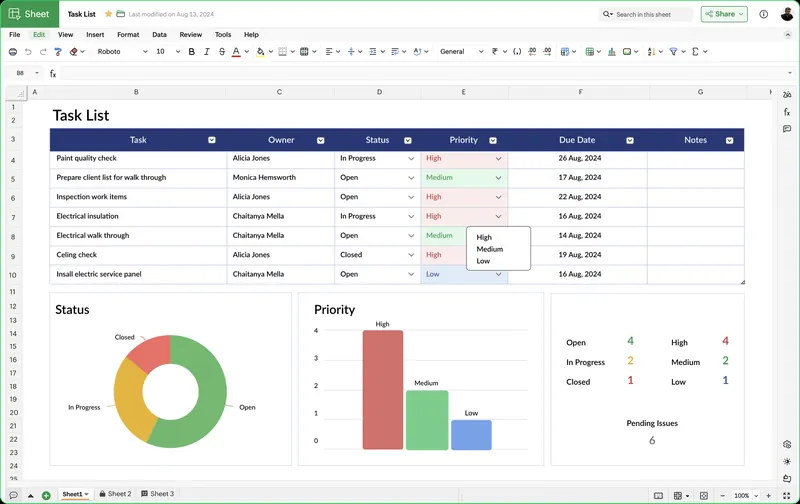
Spreadsheets for budgets and reports, edited by several people at once. Opens and saves .xlsx files.
Show
Presentations for proposals and training, shared by link. Opens .pptx files.
Cliq
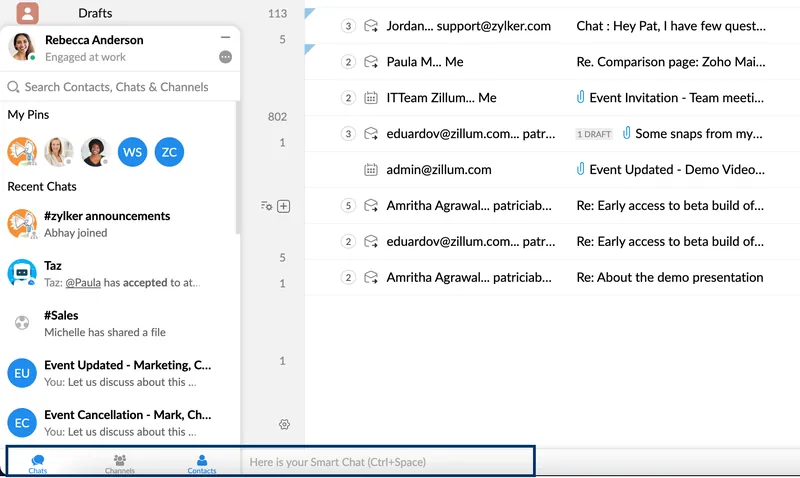
Team chat in channels, private messages and calls.
Meeting
Video calls with screen sharing and recording.
Zoho Mail and Workplace prices
| Mail Lite | Workplace Standard | Workplace Professional | |
|---|---|---|---|
| Who it's for | Email on your domain only, with calendar and contacts | Email plus shared files, documents and chat | Companies that keep correspondence for the long term and need more space |
| Price / user / month | 29 MDL/ user / month350 MDL billed annually | Price on request | Price on request |
| Email storage | 5 GB or 10 GB / user | 30 GB / user | 100 GB / user |
| File storage (WorkDrive) | — | from 100 GB / team | 1 TB / team |
| Calendar, contacts, tasks | |||
| Mobile and desktop apps | |||
| Two-factor authentication | |||
| WorkDrive, Writer, Sheet, Show | — | ||
| Cliq | basic version | ||
| Email archiving and eDiscovery | — | — | |
| Set up | Set up | Set up |
Need Workplace Enterprise or a setup for a large number of mailboxes? We'll call you.Request a call back
Zoho's official prices, converted at the MICB rate on the invoice date. The amount shown includes 20% VAT.
What we do before you send your first email from the new address
- The domain.
We use the domain you already have or register a new .md one..md domain
- DNS.
We set up the MX, SPF, DKIM and DMARC records. In short: MX says where your mail is delivered, and the other three prove your messages really come from you, so they land in spam less often.
- Mailboxes.
One for each person, plus shared addresses: office@, sales@, accounts@.
- Moving your messages.
From Gmail, Google Workspace, Microsoft 365 or any IMAP server, with the folders kept.
- Signature.
One signature for the whole team, with your company details.
- Phones and computers.
The Zoho Mail apps on phone and desktop, or Outlook connected to Zoho if the team wants to stay with it.
- A short training session.
Where the folders are, how to share the calendar, how to work with shared addresses.
How you move to Zoho Mail
- 1 / 6
You choose the plan
and the number of users, online or with us on the phone.
- 2 / 6
We verify the domain
You add a DNS verification record, or we add it if you give us access.
- 3 / 6
We set up DNS
for email: MX, SPF, DKIM, DMARC.
- 4 / 6
We move your old messages
Your old email keeps working until the day we switch the MX record, and everything received up to then is moved into Zoho.
- 5 / 6
We check
that mail arrives and goes out correctly.
- 6 / 6
The team starts
working on the new address, on desktop and mobile.
Where we move your email from
| Source | What we move |
|---|---|
| Gmail and Google Workspace | Messages, with labels turned into folders. |
| Microsoft 365 and Exchange | Messages and folders. |
| Your own server or another provider (IMAP) | Messages and folders, from any server that supports IMAP. |
You can also move just part of the team: some people switch to Zoho while the rest stay with the old provider for now, on the same domain.
Questions about Zoho Mail
I already have a domain. Do I have to transfer it to you?
No. The domain stays with your registrar. We only change the DNS records for email, with your access or together with you.
I want a new .md domain. Can you register it?
Yes. We register it in your company's name and connect it straight to Zoho Mail.
What happens to my old messages?
We move them into Zoho, with their folders. Your old email keeps working until the day we switch the MX record, and everything received up to then is moved into Zoho.
Can I work with Word and Excel files?
Yes. Writer, Sheet and Show work directly with .docx, .xlsx and .pptx files, without conversion. Colleagues using Microsoft Office open them with no trouble.
Are there apps for phone and desktop?
Yes. Zoho Mail has apps for Android, iOS, Windows and macOS, included in the subscription. If your team prefers Outlook, we connect it to Zoho.
What does ‘Lite’ mean?
Mail Lite is email only: the mailbox, calendar and contacts. For shared files, documents and team chat you need Workplace.
How do I pay?
By card, monthly or annually, through maib. Renewal is taken automatically from the saved card, and in your account you can see your invoices and cancel.
Support after launch
We keep working with your team after launch. The shape of that support is set in the contract: how many hours, which channel and how quickly we reply.
Just need the subscription?
Set it up online, choose how many users you need and pay by card.
Monday to Friday, 09:00–18:00. We reply the same working day.